Digital Cellar Notebook for Collectors & Sommeliers
Take 100% control of your wine collection, sensory tasting impressions, and cellar stock. Zero subscription fees, zero telemetry, zero cloud lock-in.
The phpMyCellar Philosophy Why Self-Hosted?
Commercial wine apps frequently lock your tasting records and bottle valuations behind subscription walls, monetize your cellar habits, or risk disappearing overnight. phpMyCellar is built from the ground up to guarantee everlasting data independence and respect your privacy.
Your cellar inventory, purchase prices, confidential notes, and merchant invoices reside securely in your own SQL database on your server, VPS, or home lab.
Choice between 20-point and 100-point rating scales with optional WSET SAT evaluation, blind tasting mode, drinking windows, bottle formats (375ml to large formats), and storage bins.
Share a real-time digital Carte des vins with dinner guests, tasting groups, or family to browse bottles that are ready to drink without exposing private costs.
Document winery visits, horizontal/vertical vintage tastings, and cellaring milestones with an integrated rich-text story editor and photo publisher.
Comprehensive Cellar Features Built for Connoisseurs
Organise bottles by rack, shelf, bin, or custom location. Track bottle formats, quantities, cost per bottle, and merchant delivery receipts with PDF invoices.
Draft detailed evaluations with a choice of 20-point or 100-point scales, plus optional WSET SAT qualitative criteria, drinking window forecasting, and blind tasting reveal mode.
Share an interactive wine list with guests filtered by cellar, keyword search, or personal favourites, and sorted by region, producer, vintage, variety, style, or maturity.
Maintain structured records of wine masters, appellations, vineyards, and historical vintage ratings aggregated automatically from your tasting log.
Role-Based Access Control (Public, Reader, Contributor, Admin) with granular permission overrides, CSRF synchronizer tokens, and locked upload paths.
Tailor site title, tagline, accent colours (IndianRed, Burgundy, etc.), currency symbols, and static pages (Welcome, Impressum, Privacy) directly from the UI.
Interactive Carte des Vins (*Wine Menu*) Hospitality View
The Carte des vins is an interactive, hospitality-focused digital wine list designed for dinner guests, tasting groups, and family. It automatically presents bottles that are ready to enjoy today while safeguarding confidential merchant purchase costs and sensitive cellar valuation records.
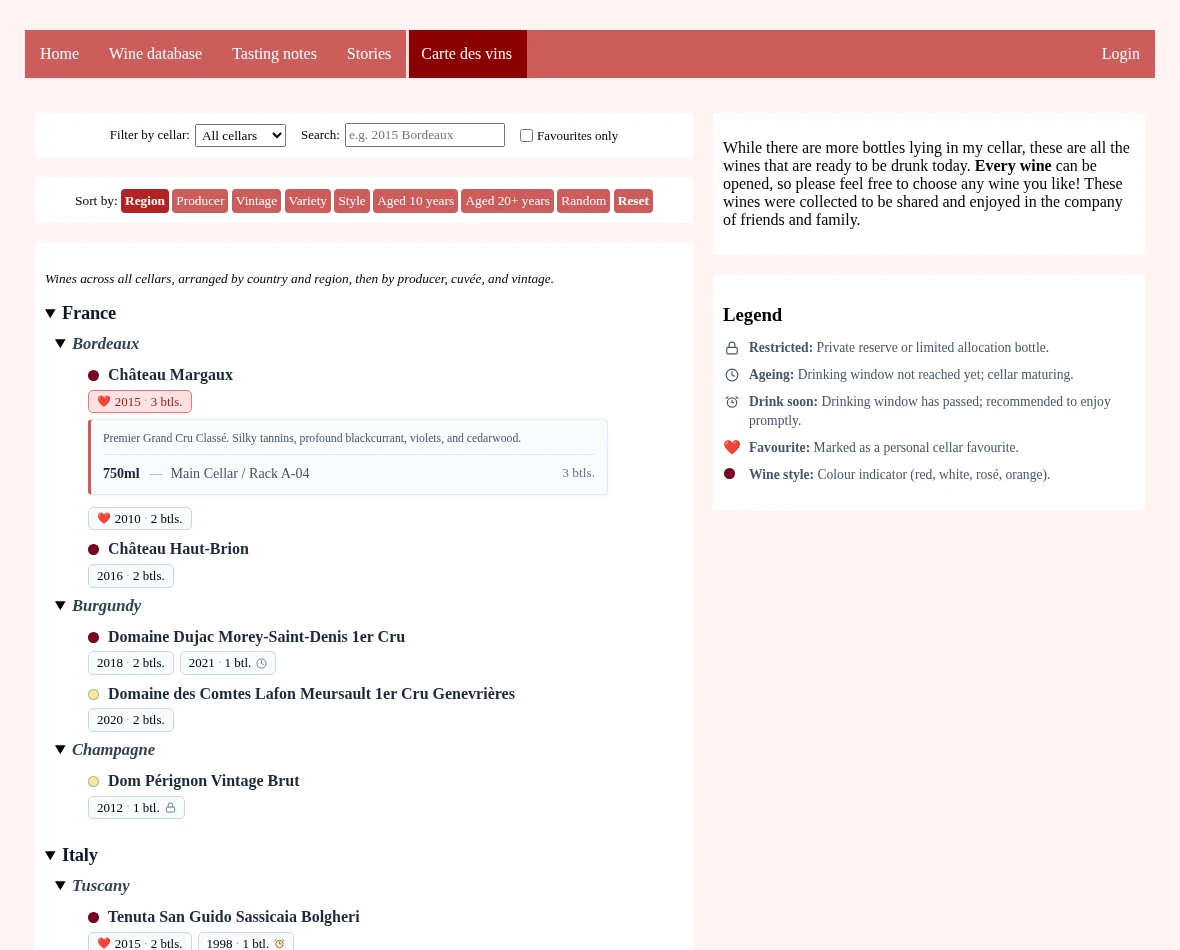
Instant keyword filtering across producers, cuvées, regions, appellations, and grapes. Sort the collection by Region, Producer, Vintage, Grape Variety, Style (dry, sweet, sparkling, fortified), or maturity (Aged 10 or 20+ years).
Compact chips display vintage years, bottle counts, and cellar favourite markers (❤️). Expanding a vintage chip reveals an interactive drawer detailing bottle formats (375ml to large formats) and precise cellar bin allocations.
Subtle status micro-icons signal cellar readiness at a glance: bottles currently maturing before their drinking window display an ageing clock, while bottles past their peak window are marked to drink soon.
Mark allocation rarities and personal treasures as Restricted to show a discreet padlock indicator. Financial purchase costs and private invoice receipts are completely hidden from the guest menu.
An official public demo instance will be launched soon. In the meantime, you can test-drive the full phpMyCellar application locally in seconds using Docker Compose.
Quick Start Installation Fast & Lightweight
phpMyCellar requires no complex JavaScript build chains or heavyweight framework runtimes. You can deploy it locally via Docker or onto any standard Linux web server with PHP and MariaDB/MySQL.
Option 1: Docker Compose (Recommended for Local & Container Deployments)
Run the full application stack including MariaDB database with two shell commands:
git clone https://github.com/dmueller-dev/phpMyCellar.git
cd phpMyCellar
docker compose up -d --build
Once started, open http://localhost:8080/install/ in your web browser to finish the web setup wizard and configure your admin account.
Option 2: Traditional Web Hosting (Apache / Nginx / VPS)
-
Upload Codebase
Copy the repository files to your web server document root (e.g.
/var/www/html/orpublic_html/). -
Configure Web Server & File Permissions
For Apache, copy
.htaccess.exampleto.htaccess. For Nginx, use the providednginx.conf.example.
Ensure write permissions on root directory (for.env),install/(forinstalled.lock), anduploads/(uploads/invoices/,uploads/img/). -
Launch the Interactive Web Installer
Navigate to
http://your-domain.com/install/. The step-by-step wizard tests database credentials, executes migrations and seed data, creates the Super-Administrator account (user_id = 1), and configures initial site branding.
| Component | Requirement | Recommended |
|---|---|---|
| PHP Runtime | PHP 7.4+ | PHP 8.1 / 8.2 / 8.3+ |
| Database | MariaDB 10.4+ / MySQL 8.0+ | MariaDB 10.11+ (utf8mb4) |
| PHP Extensions | mysqli, mbstring, session, json |
fileinfo, gd / imagick |
| Web Server | Apache 2.4+ (mod_rewrite) or Nginx 1.18+ |
Apache / Nginx with HTTPS enabled |
Documentation & User Manual Comprehensive Guides
phpMyCellar includes an in-depth user and administrator manual detailing cellar organization, scoring methodologies, role permissions, and database backup routines:
Open Source & Community
phpMyCellar is free, open-source software licensed under the MIT License. Contributions, issue reports, and feature proposals from fellow wine lovers and developers are welcome on GitHub!